CUB MOTP 隱私權政策
Privacy Policy of CUB MOTP
Privacy Policy
Effective date: January 31, 2019
CUB MOTP ("us", "we", or "our") operates the CUB MOTP mobile application (hereinafter referred to as the "Service").
This page informs you of our policies regarding the collection, use, and disclosure of personal data when you use our Service and the choices you have associated with that data. Our Privacy Policy for CUB MOTP is created with the help of the Privacy Policies website.
We use your data to provide and improve the Service. By using the Service, you agree to the collection and use of information in accordance with this policy. Unless otherwise defined in this Privacy Policy, the terms used in this Privacy Policy have the same meanings as in our Terms and Conditions.
Information Collection And Use
We collect several different types of information for various purposes to provide and improve our Service to you.
- APP相機功能僅供讀取密鑰至APP內使用。
- 應用程式以QR Code 讀取密鑰、使用者帳戶名稱至APP。
Types of Data Collected
Personal Data
While using our Service, we may ask you to provide us with certain personally identifiable information that can be used to contact or identify you ("Personal Data"). Personally, identifiable information may include, but is not limited to:
- Cookies and Usage Data
Usage Data
When you access the Service with a mobile device, we may collect certain information automatically, including, but not limited to, the type of mobile device you use, your mobile device unique ID, the IP address of your mobile device, your mobile operating system, the type of mobile Internet browser you use, unique device identifiers and other diagnostic data ("Usage Data").
Tracking & Cookies Data
We use cookies and similar tracking technologies to track the activity on our Service and hold certain information.
Cookies are files with small amount of data which may include an anonymous unique identifier. Cookies are sent to your browser from a website and stored on your device. Tracking technologies also used are beacons, tags, and scripts to collect and track information and to improve and analyze our Service.
You can instruct your browser to refuse all cookies or to indicate when a cookie is being sent. However, if you do not accept cookies, you may not be able to use some portions of our Service. You can learn more about how to manage cookies in the Browser Cookies Guide.
Examples of Cookies we use:
- Session Cookies. We use Session Cookies to operate our Service.
- Preference Cookies. We use Preference Cookies to remember your preferences and various settings.
- Security Cookies. We use Security Cookies for security purposes.
Use of Data
CUB MOTP uses the collected data for various purposes:
- To provide and maintain the Service
- To notify you about changes to our Service
- To allow you to participate in interactive features of our Service when you choose to do so
- To provide customer care and support
- To provide analysis or valuable information so that we can improve the Service
- To monitor the usage of the Service
- To detect, prevent and address technical issues
Transfer Of Data
Your information, including Personal Data, may be transferred to — and maintained on — computers located outside of your state, province, country or other governmental jurisdiction where the data protection laws may differ than those from your jurisdiction.
If you are located outside Taiwan and choose to provide information to us, please note that we transfer the data, including Personal Data, to Taiwan and process it there.
Your consent to this Privacy Policy followed by your submission of such information represents your agreement to that transfer.
CUB MOTP will take all steps reasonably necessary to ensure that your data is treated securely and in accordance with this Privacy Policy and no transfer of your Personal Data will take place to an organization or a country unless there are adequate controls in place including the security of your data and other personal information.
Disclosure Of Data
Legal Requirements
CUB MOTP may disclose your Personal Data in the good faith belief that such action is necessary to:
- To comply with a legal obligation
- To protect and defend the rights or property of CUB MOTP
- To prevent or investigate possible wrongdoing in connection with the Service
- To protect the personal safety of users of the Service or the public
- To protect against legal liability
Security Of Data
The security of your data is important to us, but remember that no method of transmission over the Internet, or method of electronic storage is 100% secure. While we strive to use commercially acceptable means to protect your Personal Data, we cannot guarantee its absolute security.
Service Providers
We may employ third party companies and individuals to facilitate our Service ("Service Providers"), to provide the Service on our behalf, to perform Service-related services or to assist us in analyzing how our Service is used.
These third parties have access to your Personal Data only to perform these tasks on our behalf and are obligated not to disclose or use it for any other purpose.
Links To Other Sites
Our Service may contain links to other sites that are not operated by us. If you click on a third party link, you will be directed to that third party's site. We strongly advise you to review the Privacy Policy of every site you visit.
We have no control over and assume no responsibility for the content, privacy policies or practices of any third party sites or services.
Children's Privacy
Our Service does not address anyone under the age of 18 ("Children").
We do not knowingly collect personally identifiable information from anyone under the age of 18. If you are a parent or guardian and you are aware that your Children has provided us with Personal Data, please contact us. If we become aware that we have collected Personal Data from children without verification of parental consent, we take steps to remove that information from our servers.
Changes To This Privacy Policy
We may update our Privacy Policy from time to time. We will notify you of any changes by posting the new Privacy Policy on this page.
We will let you know via email and/or a prominent notice on our Service, prior to the change becoming effective and update the "effective date" at the top of this Privacy Policy.
You are advised to review this Privacy Policy periodically for any changes. Changes to this Privacy Policy are effective when they are posted on this page.
Contact Us
If you have any questions about this Privacy Policy, please contact us:
- By email: cjt74392@gmail.com
HTC M8 刷入 Android 7.1.1 牛軋糖
雖然已經換M10,M8其實還是有它的用途,M8 原廠作業系統用起來卡的,很慢。
M8刷入 Android 7.1.1 牛軋糖快得像飛似的。
主要下兩個檔案
ROM
http://dwnld.aicp-rom.com/?device=m8
GAPPS- ARM/7.1/stock
http://opengapps.org/
TWRP Recovery必備,且版本請到2.8.6.0以上
下面原廠寫得比我好,我簡單翻譯
下載ROM和GAPPS複製到手機SD卡,並將boot.img另外取出放到電腦手機SDK工具目錄。


Step 12 – Now go back to the main menu and then tap on the ‘Install’ button. From the list, choose the ZIP file that you copied to your phone memory in Step 3.


Step 14 – Once the installation is completed, you will be shown a similar screen like the following:


Google Apps: Repeat the above step for the Gapps zip file as well and install it on your phone.
最重要的是,最後不要刷TWRP的root工具,請略過,不然開不了機。
M8刷入 Android 7.1.1 牛軋糖快得像飛似的。
主要下兩個檔案
ROM
http://dwnld.aicp-rom.com/?device=m8
GAPPS- ARM/7.1/stock
http://opengapps.org/
TWRP Recovery必備,且版本請到2.8.6.0以上
下面原廠寫得比我好,我簡單翻譯
下載ROM和GAPPS複製到手機SD卡,並將boot.img另外取出放到電腦手機SDK工具目錄。
Step 1 – Download Android 7.1.1 AICP ROM for One M8 to your computer and extract boot.img from the zip file separately. Download Google Apps as well.
Step 2 – Connect and mount your One M8 USB memory to your computer using the USB cable.
Step 3 – Now copy/paste the downloaded Android 7.1.1 ROM zip and Google Apps zip files to your phone memory / SD card. Make sure the file is in the phone memory / SD card root (not in any folder).
Step 4 – Copy/paste the boot.img file to android-sdk-windows\platform-tools directory.
Step 5 – Then turn OFF your phone and disconnect from the USB cable.
Step 6 – Now to get in the Bootloader/Fastboot Mode. Turn ON the phone while pressing and holding the Volume Down + Power buttons.
Step 7 – Once in the Fastboot mode (on your phone), navigate to android-sdk-windows\platform-tools directory (on your computer) and open Command Prompt (Shift + Right-click > Open Command Prompt).
刷入boot.img
Step 8 – Type the following command and press Enter.
fastboot flash boot boot.img
Step 9 – Then, type the following command and press Enter.
fastboot reboot
安裝ROM和GAPPS
Step 10 – Follow the navigation instructions on the screen. Select BOOTLOADER and then go to RECOVERY. Alternatively, read this: How to Enter Recovery Mode on Any Android Phone.
NOTE: Screenshots of the Team Win Recovery Project (TWRP Recovery) may change as new versions are released.
Step 11 – Once you are in TWRP Recovery, perform a full data wipe by tapping on the ‘Wipe’ button. Then swipe on the “Swipe to Factory Reset” option at the bottom.
Step 13 – Confirm installation on the next screen by swiping on the “Swipe to Confirm Flash” option. The installation procedure should start now as show below.
Step 15 – Tap on the “Wipe cache/dalvik” button if you get into any boot loops or other issues.
最重要的是,最後不要刷TWRP的root工具,請略過,不然開不了機。
Step 16 – You can now reboot your phone by selecting the “Reboot System” button.
如何陪伴小一新鮮人,快樂學習健康成長

一杯咖啡的時間,一輩子的回憶
今年8月29日,也是全國小一新生入學的日子,應邀於我的母校天母國小,以過來人的身分,與新生家長分享如何陪伴小一新鮮人,快樂學習健康成長,並以親子陪伴孩子閱讀與運動為主軸,除揭示運動對孩子的重要性外,也分享他陪伴孩子每日睡前讀床邊故事的經驗,也藉此機會拋磚引玉,期待父母能每日花一點點時間,如喝一杯咖啡的時間,為孩子讀床邊故事,日積月累長此以往,卻是孩子一輩子的甜蜜的回憶。如何陪伴小一新鮮人,快樂學習健康成長
(口白部分僅當天家長聆聽)
延伸閱讀連結
Android Studio - Could not resolve all dependencies for configuration ':app:_debugUnitTestCompile

Android Studio
Error:
Could not resolve all dependencies for configuration ':app:_debugUnitTestCompile
It can happen if you have proxy settings and you are not connected to it.
Create and Edit gradle.properties
C:\Users\NAME\.gradle\.gradle.properties
systemProp.http.proxyHost=www.somehost.org
systemProp.http.proxyPort=8080
systemProp.http.proxyUser=userid
systemProp.http.proxyPassword=password
systemProp.http.nonProxyHosts=*.nonproxyrepos.com|localhost
systemProp.https.proxyHost=www.somehost.org
systemProp.https.proxyPort=8080
systemProp.https.proxyUser=userid
systemProp.https.proxyPassword=password
systemProp.https.nonProxyHosts=*.nonproxyrepos.com|localhost
other:
1.Download gradle
2.untar and set gradle home dir in Android Audio
C:\Program Files\Android\Android Studio\gradle\gradle-x.x
OpenStack Liberty 安裝上遇到的問題及解法

Control Server Install
------------------------
$ packstack如果失敗,解決問題後用以下指令繼續安裝
$ packstack --answer-file=/root/packstack-answers-xxxxxxxxxx.txt
Q&A
-------------------------
<<< DB >>>Q1:
Icehouse puppet DB pid error
A1:
$ vi /usr/lib/python2.7/site-packages/packstack/puppet/templates/mongodb.pp
pidfilepath => '/var/run/mongodb/mongod.pid'
Q2:
Error: Execution of '/usr/bin/yum -d 0 -e 0 -y install mongodb-server' returned 1: Yum command has been deprecated, redirecting to '/usr/bin/dnf -d 0 -e 0 -y install mongodb-server'.
A2:
$ vim /usr/share/openstack-puppet/modules/mongodb/manifests/params.pp
- $pidfilepath = '/var/run/mongodb/mongodb.pid'
+ if ($::operatingsystem == 'fedora' and versioncmp($::operatingsystemrelease, '23') >= 0 or
+ $::operatingsystem != 'fedora' and versioncmp($::operatingsystemrelease, '7.0') >= 0) {
+ $pidfilepath = '/var/run/mongodb/mongod.pid'
+ } else {
+ $pidfilepath = '/var/run/mongodb/mongodb.pid'
+ }
ps: operatingsystemrelease, '23' or 22 or 21 or other
Q3:
packstack get python-eventle error
A3:
删除最新版本, pip uninstall eventlet
再重新安装0.15版本解决,用yum自带的吧yum reinstall python-eventle
Q4:
ERROR : Error appeared during Puppet run: x.x.x.x_keystone.pp
Error: /Stage[main]/Neutron::Keystone::Auth/Keystone_user[neutron]:
Could not evaluate: Execution of '/usr/bin/keystone --os-auth-url http://127.0.0.1:35357/v2.0/
token-get' returned 1: The request you have made requires authentication.
A4:
$ mysql
mysql> use keystone;
mysql> delete from token;
mysql> delete from user;
Q5:
ERROR : Error appeared during Puppet run: x.x.x.x_provision_demo.pp
Error: Failed to apply catalog: Can't retrieve net-show because Neutron or Keystone API is not available.
Unable to find network with name 'from gi.repository import GnomeKeyring'". Retrying for 5 sec.
Notice: Puppet::Type::Neutron_network::ProviderNeutron: Unable to complete neutron request due to non-fatal error: "Execution of '/usr/bin/neutron net-show --format=shell from gi.repository import GnomeKeyring' returned 1: /usr/lib/python2.7/site-packages/keyring/backends/Gnome.py:6: PyGIWarning: GnomeKeyring was imported without specifying a version first. Use gi.require_version('GnomeKeyring', '1.0') before import to ensure that the right version gets loaded.
from gi.repository import GnomeKeyring
Unable to find network with name 'from gi.repository import GnomeKeyring'". Retrying for 1 sec.
Error: Failed to apply catalog: Can't retrieve net-show because Neutron or Keystone API is not available.
A5:
** You can "fix" (?) this problem by modifying the top of /usr/lib/python2.7/site-packages/keyring/backends/Gnome.py, replacing this:
try:
from gi import Repository
if Repository.get_default().enumerate_versions('GnomeKeyring'):
from gi.repository import GnomeKeyring
except ImportError:
pass
With this:
try:
from gi import Repository, require_version
if Repository.get_default().enumerate_versions('GnomeKeyring'):
require_version('GnomeKeyring', '1.0')
from gi.repository import GnomeKeyring
except ImportError:
pass
NOVA Client install
------------------------
$ yum install openstack-nova-compute sysfsutils$ egrep -c '(vmx|svm)' /proc/cpuinfo
If this command returns a value of one or greater, your compute node supports hardware acceleration which typically requires no additional configuration.
If this command returns a value of zero, your compute node does not support hardware acceleration and you must configure libvirt to use QEMU instead of KVM.
Edit the [libvirt] section in the /etc/nova/nova.conf file as follows:
[libvirt]
virt_type = qemu
$ service openstack-nova-compute start
$ service messagebus start
$ service libvirtd start
$ chkconfig openstack-nova-compute on
$ chkconfig libvirtd on
or
$ systemctl enable libvirtd.service openstack-nova-compute.service
$ systemctl start libvirtd.service openstack-nova-compute.service
== On server side check ==
nova service-list
nova image-list
GTA 5 game crash ERR_GFX_D3D
這個問題,我已經更新到到最新的驅動程式及patch
試過了以下所有方法(請不要試)
1.改seting檔 2 or 1 to 0 強迫用 DirectX 10
2.刪除兩個遊戲目錄下的檔案....開遊戲更新後不就又恢復了嗎? 很呆, 但我是還試了.
3.把草的顯示品質調低
4.把垂直同步....等一堆功能調低或關閉......等等
以上都不是正確的解法

1.下載 nvidiaInspector
2.程式開啟後點選Diver Version旁的圖案, 查看顯示卡官方出廠的GPU clock是多少,目前超頻了多少.
3.點選Show overclock,再右邊選項調低GPU clock至公版出廠值.
4.點選apply clocks&change你會發現左邊GPU會降低.
5.點選create clock shortcute,如果重開機設定會恢復, 在桌面點此捷徑可恢復降頻設定.
經過調整後GTA 5 再也沒有當機出現ERR_GFX_D3D的錯誤當機狀況
試過了以下所有方法(請不要試)
1.改seting檔 2 or 1 to 0 強迫用 DirectX 10
2.刪除兩個遊戲目錄下的檔案....開遊戲更新後不就又恢復了嗎? 很呆, 但我是還試了.
3.把草的顯示品質調低
4.把垂直同步....等一堆功能調低或關閉......等等
以上都不是正確的解法
真正的原因....顯示卡出廠時就已經超頻了

2.程式開啟後點選Diver Version旁的圖案, 查看顯示卡官方出廠的GPU clock是多少,目前超頻了多少.
3.點選Show overclock,再右邊選項調低GPU clock至公版出廠值.
4.點選apply clocks&change你會發現左邊GPU會降低.
5.點選create clock shortcute,如果重開機設定會恢復, 在桌面點此捷徑可恢復降頻設定.
經過調整後GTA 5 再也沒有當機出現ERR_GFX_D3D的錯誤當機狀況
Tag :
Game


HTC M8 root後 安裝官方更新 及 換機感想
root後如何安裝官方更新?
M8 root方法網路上多如牛毛, 我不再贅述.
root後要執行官方更新, 在網路上有許多錯誤說法,
其實很簡單的...
1.只要沒有亂刪除內建APP或檔案, (ex Android 4.4 upgrade to 5.0.1就必須使用4.4原廠的recovery)
刷回原廠Recovery image 就可以正常更新了!!
fastboot flash recovery ori-recovery.img
2.更新完後再刷回第三方recovery即可.
2.更新完後再刷回第三方recovery即可.
fastboot flash recovery 3-party-recovery.img
3.If fail ....更新完開機卡在HTC ONE
(1)先刷對應要安裝版本的recovery
(2)Custom recovery 安裝 ROM之前
在 "WIPE" 這裡只選擇 "wipe system" (其他的 data 不要wipe)
(ex:M8_UL_L50_SENSE60_MR_hTC_Asia_TW_4.24.709.3_V0.0.zip )
(3)然後recovery 刷ROM "restore rom", 可保留原本的資料
另外如果只是要用TWRP升System, EX: 4 --> 6
1.分位用原廠Recovery及OTA升級應可完成,通常是卡後面的系統檔案檢核不過
刷機先確認機子裡的系統分位是哪個版本,用指令察看 fastboot getvar all (version-main:)
2.Wipe cache 及 dalvik cache (data不要wipe)
3.TWRP Restore 選 Boot 和 System
4.畫面會停在HTC One一陣子,有聽到開機聲音就有在升級 (手機怎麼沒有一個 I/O 燈號?)
其他事項:
強制重開機方式 : 電源鍵+音量放大鍵 10秒
你真的需要 S-OFF嗎?
手機不需要做S-OFF, 必竟為了安全考量, 有需要~再刷需要的軟體就好, 把System下檔案資料可隨意讓程式寫入,不是什麼聰明的事, 可以su ,在執行備份及日常的操作已上經足夠.
換機感想
HTC J 後, 我換了HTC M8 金.
而WiMAX隨LTE 4G的誕生, 看來也將走入歷史.
M8 金屬質感非常美麗,稱得上頂級工藝, 但是非常的滑手,
DOT View是HTC非常棒創新產品,我非常喜愛,
而且剛好能解決滑手的問題. 推薦必買.

後記
8/25
M8我使用三個多月後, 某天相機鏡頭破了. 並沒有摔到或碰撞.
是否有其他網友遇到相同的狀況? (HTC報價700)
畢竟小弟我在眾多HTC手機中,我第一次遇到. 不過上網一查, 真是嚇一跳. 看來不是單一事件.
HTC One (M8): Camera lens cover issue
HTC One M8鏡頭:竟如此弱不禁風
M8後鏡頭刮花?油汙?
HTC One (M8): Camera lens cover issue
HTC One M8鏡頭:竟如此弱不禁風
M8後鏡頭刮花?油汙?
Nexus 7 觸控亂跳問題解決 (ghost input)
以下所談到的 非 2013 Nexus 7
-----------------------------------
我喜愛的鋼琴遊戲及神魔之塔都無法正常執行,比我買2999白牌的平板觸控還糟糕100倍.
難不成要我送修ASUS,一查看網上一堆人吃悶虧,不如自己想辦法好了.
Google也許解決不了它自己的產品問題,但是搜尋器總有點用處吧,
拾人芽慧, 比坐以待斃來的可靠.
XDA總是有神人的出現, 彷彿救世主.我終於找到一篇像樣的文章了.
原來問題的答案是.............電 流 干 擾
很蠢得答案, 但是, 就是這麼蠢.
我們就來點解法, 很簡單, 很便宜,
網路上謠傳更新軟體版本後修正,事實上不能.
我覺得是電流因軟體及個人使用方式而改變,所以有時關掉後能舒緩一下活潑亂跳的觸控.
ASUS製程設計上,看來需要好好要求一下.別丟國人的臉阿.
我覺得是電流因軟體及個人使用方式而改變,所以有時關掉後能舒緩一下活潑亂跳的觸控.
ASUS製程設計上,看來需要好好要求一下.別丟國人的臉阿.
1.用你的指甲來協助打開Nexus後蓋.
2,將紅框標示的電線位置下面墊一個塑膠墊 (到那找塑膠墊阿 !!!!)
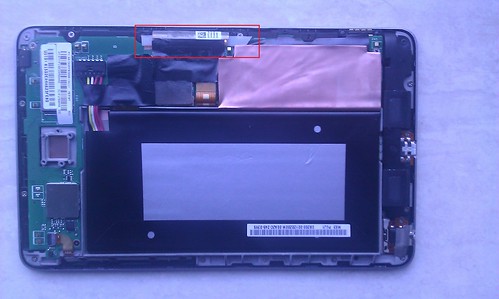
3.拿便利商店就有的吸管用剪刀對半裁切出一小塊就可以了, 從下面穿近去.
吸管完美而自然的弧度剛好包裹住.提供適當的支撐與阻隔,渾然天成.
活潑亂跳的觸控終於不再來煩我了.
活潑亂跳的觸控終於不再來煩我了.
4.但是觸控偶爾失靈的現象仍然會有. 只能關銀幕再開.
...............完..................2013/08/27
2013/11/27
三個月後, 亂跳是沒發生了, 但是觸控失靈嚴重,
滑動時常會突然停止, 認為手指已提起,
而Touch test從新機買回後,從沒10點觸控正常過, 還是忍耐了數月,
現在只好在保固內趕緊送回華碩修了.
2013/11/30
三天內就送修回來了,觸控恢復正常,宅配到家。
維修內如容寫更新軔體,恢復出廠預設值. 雖然有點瞎, 但至少是很快速的修好了.
2013/11/27
三個月後, 亂跳是沒發生了, 但是觸控失靈嚴重,
滑動時常會突然停止, 認為手指已提起,
而Touch test從新機買回後,從沒10點觸控正常過, 還是忍耐了數月,
現在只好在保固內趕緊送回華碩修了.
2013/11/30
三天內就送修回來了,觸控恢復正常,宅配到家。
維修內如容寫更新軔體,恢復出廠預設值. 雖然有點瞎, 但至少是很快速的修好了.
Line 3.7.0 Rilakkuma 拉拉雄(輕松熊) 風格
網路上有多LINE 主題, 我喜歡其中一款 Rilakkuma, 很適合女生用,
但是沒找到3.7.0的版本, 所以就用網路上的資源隨意下載一版,(抱歉實在是搞不清處出了)
我在下載回來的版本中, 修改了幾張圖示,
讓LINE更有 Rilakkuma的風格.


1.LINE 3.7.0 -Rilakkuma 下載
2.Rilakkuma Theme 下載
(1)請到LINE設定安裝兔兔的主題,並套用,
(2).然後將剛剛下載的theme檔案覆蓋下面已存在的檔
SDCARD\Android\data\jp.naver.line.android\theme\a076xxxxxxxxxxxxxxxxxxxxx
(3)到LINE設定套用原設定,再套用一次兔兔的主題,就完成,
Ps:如果裝的是原版, 請先移除再裝, 如果曾經裝過任合一個改過的版本, 直接安裝即可.
但是沒找到3.7.0的版本, 所以就用網路上的資源隨意下載一版,(抱歉實在是搞不清處出了)
我在下載回來的版本中, 修改了幾張圖示,
讓LINE更有 Rilakkuma的風格.


1.LINE 3.7.0 -Rilakkuma 下載
2.Rilakkuma Theme 下載
(1)請到LINE設定安裝兔兔的主題,並套用,
(2).然後將剛剛下載的theme檔案覆蓋下面已存在的檔
SDCARD\Android\data\jp.naver.line.android\theme\a076xxxxxxxxxxxxxxxxxxxxx
(3)到LINE設定套用原設定,再套用一次兔兔的主題,就完成,
Ps:如果裝的是原版, 請先移除再裝, 如果曾經裝過任合一個改過的版本, 直接安裝即可.
HTC J 加裝 悠遊魔(膜)
我的手機今天加裝了悠遊魔(膜), 對於有時帶手機出門但忘了帶皮夾的我, 是一大福音,
至少還有些錢可以在便利商店扣用, 也有公車/捷運費可用.
在NFC手機全面普及前, 悠遊魔還是不錯的替代方案.

主要好處是可用手機查詢餘額與交易,
再申辦手機條碼, 電子發票就可以自動對獎, 對忙碌的人來說非常實用.
而其它的悠遊卡, iCash卡, 銀行含悠悠卡功能的卡片, 都可以設定在同一歸戶下一起管理.
(需先至7-11加值機申請悠遊卡驗證碼)
在NFC手機全面普及前, 悠遊魔還是不錯的替代方案.

主要好處是可用手機查詢餘額與交易,
再申辦手機條碼, 電子發票就可以自動對獎, 對忙碌的人來說非常實用.
而其它的悠遊卡, iCash卡, 銀行含悠悠卡功能的卡片, 都可以設定在同一歸戶下一起管理.
(需先至7-11加值機申請悠遊卡驗證碼)
二代電子發票 手機條碼申請
https://www.einvoice.nat.gov.tw/APMEMBERVAN/GeneralCarrier/QueryInv
悠遊魔如何安裝, 我想官網和眾多的開箱文很多, 不多贅述.
http://easycity.com.tw/yoyo_02_02.htm
悠遊魔如何安裝, 我想官網和眾多的開箱文很多, 不多贅述.
http://easycity.com.tw/yoyo_02_02.htm
只提幾點安裝注意事項
1.SIM卡太厚, 可以拿刀片將三個邊刮薄一點, 卡才放的進去.
2.拆卸SIM卡都要用輔助滑片, 雖然裝好就不需要用, 但沒裝好無法判別SIM卡,如要重新調整或日後換卡換手機仍要靠它.
特別要提到:
今天幫我裝卡的兩位太思員工,
今天幫我裝卡的兩位太思員工,
一位是態度認真的女工程師, 幫我確認驗證機殼感應磁波能否穿透,
一位是挺著8個月大肚子, 仍熱心服務與解說, 都讓我印象深刻.
Tag :
Android
HTC J 4.1.1 root 及 清除不必要的系統App 及 顯示電量百分比
一.Boot Loader解鎖
完成 解鎖後 所有安裝過的App和資料都會刪除
1.獲得您手機專用的unlock_code.bin, 請至官方HTC 官方解鎖網址 http://www.htcdev.com/2.詳細步驟請參照 http://htcbbs.cnmo.com/thread-12312056-1-1.html
3.開機完你會發現工程模式畫面上方出現粉紅色 ****Tampered Unlocked ****
fastboot flash recovery valentewx-recovery3.img
重開機按住音量 - 進入手機Recovery模式, 刷入SuperSU
root完成!
二.刷HTC J 專用Recovery image
下載 HTC J 專用Recovery image, (以下所有提到的軟體,都請放進SD卡)
重開機按住音量 - 進入手機BootLoader模式
cd /AdbDir/xxxxx
三.為得root權限, 刷入su 的 binary
SuperSU CWM / TWRP / MobileODIN installable ZIP下載後,重開機按住音量 - 進入手機Recovery模式, 刷入SuperSU
root完成!
四.我個人製作的Patch.
- 清系統內建App的刷機包 下載點
因為出廠時內建很多系統的App,但可能不是我們需要的, 因為沒有手機S-OFF,
即使您用SystemRemover之類的軟體移除, 也是在開機後重裝回去.
所以我做了一個移除Twitter. Weibo, Sina Weibo, KKBOX 等軟體的Path給各位刷
原廠電量百分比的 下載點
*** 2013/08/30 ***
如果您因為刪除了系統內建的APK導致無法更新HTC官方的更新(出現ststus 7的錯誤)
OTA_VALENTEC9_WX_JB_45_S_hTC_Asia_TW_3.05.709.1-3.04.709.1_release_32270825gvwsrp8x7kut2p
您可以下載我修正過後的更新檔,[刷機前建議先備份]
然後開機進Recovery刷進去,系統就可以正常升級了.
當然, 我這個版本也不會安裝 微博,新浪....等等我們不想要預裝的APK,而官方此次更新已內建可顯示電池電量.
ps:1.如果不是用我的清除包,您自行砍了系統內建的其它APK.請您修改刷機包內的updater-script.
2.裝完如果google play有問題可以先到新增移除程式將它移除,使用系統內建的即可.
3.此次HTC更新,完成後桌面設定會重置.如果需要可以先備份.或使用HTC輕松上手同步設定.
4.本次HTC的更新仍未修復Master Key金鑰漏洞.
5.su需要重刷.
個人對HTC J的心得及後記:
1.HTC J 是我繼Desire HD後買的手機, 因它WiMax 4G的的功能是手機除了打電話外最重要的上網功能所必需. CPU夠力, 電力也足,電池可換, 而蝴蝶機太貴, 後繼手機好的貴的非常多, 但是都沒有4G(我從不用3G,貴又慢), 預期下一隻手機可能要等台灣4G LTE建好及NFC成熟後才需要換,
2.此手機不需要做S-OFF, 必竟為了安全考量, 有需要再刷需要的軟體就好, 把System下檔案資料可隨意讓程式寫入,不是什麼聰明的事, 可以su 應該在備份或做些日常的操作已足已.
3.要玩FB網頁遊戲可以安裝FireFox加Flash就可以正常玩, CPU尚夠應付, 唯Android 4以後, 對JAR檔的支援,JBED的JAVA JVM模擬已經失效, 除了重編譯, 我還找不出好方法.
4.銀幕小了點,(省電), 沒有NFC, 除此外我挑不出這隻的缺點.
Tag :
Android
AIX 7.1 + Apache 2.4 + PHP libphp5.so with PDO
The following experience, it took me a lot of time .....may help you.
1.Download PHP 5.2.14 (Other version NOT successed)
2.AIX 7.1 need vi/include/gd_io.h , typedef struct gdIOCtx add void *data;
3.Edit PHP Makefile add this
PHP_CLI_OBJS = sapi/cli/php_cli.lo sapi/cli/php_http_parser.lo sapi/cli/php_cli_server.lo $(PHP_BINARY_OBJS)
PHP_CGI_OBJS = sapi/cgi/cgi_main.lo sapi/cgi/fastcgi.lo main/internal_functions.lo
4.Edit PHP sapi/apache2handler/php_functions.c (becouse we use Apache 2.4 NOT 2.2)
- AP_DECLARE_DATA extern unixd_config_rec unixd_config;
+ AP_DECLARE_DATA extern unixd_config_rec ap_unixd_config;
- snprintf(tmp, sizeof(tmp), "%s(%d)/%d", unixd_config.user_name, unixd_config.user_id, unixd_config.group_id);
+ snprintf(tmp, sizeof(tmp), "%s(%d)/%d", ap_unixd_config.user_name, ap_unixd_config.user_id, ap_unixd_config.group_id);
5.Link some file ....
ls -s /opt/freeware/bin/pg_config /usr/bin/pg_config
ls -s /opt/freeware/bin/mysql_config /usr/bin/mysql_config
ln -s /opt/freeware/lib/libcrypto.so.0.9.8 /opt/freeware/lib/libcrypto.so (OpenSSL ver cant greater than 0.9.8)
6.Configure PHP 5.2.14 with
./configure --prefix=/opt/freeware --with-apxs2=/opt/freeware/bin/apxs --with-zlib --with-zlib-dir=/opt/freeware --with-gd=/opt/freeware --with-freetype-dir=/opt/freeware --with-png-dir=/opt/freeware --with-mysql=/usr/local/mysql --with-mcrypt=/opt/freeware --enable-mbstring --with-gettext=/opt/freeware --with-libxml-dir=/opt/freeware/lib --enable-sockets --with-pcre-dir=/opt/freeware --with-snmp=/opt/freeware --with-openssl=/opt/freeware --with-bz2=/opt/freeware --with-jpeg-dir=/opt/freeware --enable-bcmath --enable-calendar --enable-maintainer-zts --disable-static --enable-shared --enable-ftp --with-curl=/opt/freeware --with-pdo-mysql=/usr/local/mysql --with-t1lib=/opt/freeware --with-libmbfl --with-iconv=/opt/freeware --with-iconv-dir=/opt/freeware --with-xpm-dir=/opt/freeware --enable-json --with-mysqli=/usr/local/mysql/bin/mysql_config --with-pgsql=/opt/freeware/bin/pg_config --with-pdo-pgsql=/opt/freeware/bin/pg_config
7.Make and Copy module
make
cp .libs/libphp5.so /xxx/xxx/apache/modules/ (xxx depend on your apache config)
Other note -- Upgrading to 2.4 from 2.2
http://httpd.apache.org/docs/2.4/upgrading.html
1.Download PHP 5.2.14 (Other version NOT successed)
2.AIX 7.1 need vi
3.Edit PHP Makefile add this
PHP_CLI_OBJS = sapi/cli/php_cli.lo sapi/cli/php_http_parser.lo sapi/cli/php_cli_server.lo $(PHP_BINARY_OBJS)
PHP_CGI_OBJS = sapi/cgi/cgi_main.lo sapi/cgi/fastcgi.lo main/internal_functions.lo
4.Edit PHP sapi/apache2handler/php_functions.c (becouse we use Apache 2.4 NOT 2.2)
- AP_DECLARE_DATA extern unixd_config_rec unixd_config;
+ AP_DECLARE_DATA extern unixd_config_rec ap_unixd_config;
- snprintf(tmp, sizeof(tmp), "%s(%d)/%d", unixd_config.user_name, unixd_config.user_id, unixd_config.group_id);
+ snprintf(tmp, sizeof(tmp), "%s(%d)/%d", ap_unixd_config.user_name, ap_unixd_config.user_id, ap_unixd_config.group_id);
5.Link some file ....
ls -s /opt/freeware/bin/pg_config /usr/bin/pg_config
ls -s /opt/freeware/bin/mysql_config /usr/bin/mysql_config
ln -s /opt/freeware/lib/libcrypto.so.0.9.8 /opt/freeware/lib/libcrypto.so (OpenSSL ver cant greater than 0.9.8)
6.Configure PHP 5.2.14 with
./configure --prefix=/opt/freeware --with-apxs2=/opt/freeware/bin/apxs --with-zlib --with-zlib-dir=/opt/freeware --with-gd=/opt/freeware --with-freetype-dir=/opt/freeware --with-png-dir=/opt/freeware --with-mysql=/usr/local/mysql --with-mcrypt=/opt/freeware --enable-mbstring --with-gettext=/opt/freeware --with-libxml-dir=/opt/freeware/lib --enable-sockets --with-pcre-dir=/opt/freeware --with-snmp=/opt/freeware --with-openssl=/opt/freeware --with-bz2=/opt/freeware --with-jpeg-dir=/opt/freeware --enable-bcmath --enable-calendar --enable-maintainer-zts --disable-static --enable-shared --enable-ftp --with-curl=/opt/freeware --with-pdo-mysql=/usr/local/mysql --with-t1lib=/opt/freeware --with-libmbfl --with-iconv=/opt/freeware --with-iconv-dir=/opt/freeware --with-xpm-dir=/opt/freeware --enable-json --with-mysqli=/usr/local/mysql/bin/mysql_config --with-pgsql=/opt/freeware/bin/pg_config --with-pdo-pgsql=/opt/freeware/bin/pg_config
7.Make and Copy module
make
cp .libs/libphp5.so /xxx/xxx/apache/modules/ (xxx depend on your apache config)
Other note -- Upgrading to 2.4 from 2.2
http://httpd.apache.org/docs/2.4/upgrading.html
Tag :
AIX
Desire HD 刷 JellyBean Android 4.2.1
沒有安裝Sense的HTC Desire HD,介面速度大幅度的提升,
和iPhone般的順暢感非常棒,
0.首先 備份你的手機資料.
1.下載ROM CodeFire ACE
2.Full wipe,刷 JellyBean ROM, 請刷完先重開機.
3.下載 Google 應用整合包, 並刷進手機,不然OS並沒有內建Google App.
我個人建議安裝的軟體
1.時鐘和天氣,Transparent clock & weather
如果喜歡HTC的老樣子,建議裝Fancy Widgets
2.Launcher建議用Apex Launcher 功能完善,設定很多,自己玩看看.
3.修改/system/etc/gps.conf,NTP_SERVER=pool.ntp.org改成NTP_SERVER=tw.pool.ntp.org,不改也是OK,第一次定位較久.
4.Apex Theme有很多選擇,有特殊美感喜好的,再挑個您滿意的刷.
5.如果喜歡將電源鍵改到搜尋鍵,以增加電源鍵壽命,可以修改/system/usr/keylayout/synaptics-rmi-touchscreen.kl
將217 SERACH改成217 POWER
問題集:
1.刷更新版:更新新版ROM時不需full wipe,直接刷可保留設定. 但google appp要重刷最新版才不會有問題.
2.如果發現部份APP有問題,如時鐘, 可至應用程式,清除應用程式資料,應可恢復正常.
3.最後...APP仍有問題,建議移除後重裝也會正常.
以下APP問題,如有網友知道怎麼解的請留研告訴我,謝謝!
4.Titanium backup roo SR1後就失效了, 原因不明. 其它軟體root正常.
5.QRcode對焦異常.


Linux 玩 GW2 (Guild Wars 2 on CentOS )
1.Install Proprietary drivers for your graphics card
NVIDIA Driver Version 310.14+
2.Install wine
Download wine source
http://sourceforge.net/projects/wine/files/Source/
3.cd wine
./configure
4.Install GW2 or copy Gw2 director to linux
5.Create Gw2.sh
#!/bin/bash
export WINEDEBUG=fixme-all
export LD_PRELOAD="libpthread.so.0 libGL.so.1"
export __GL_THREADED_OPTIMISATIONS=1
wine explorer /desktop=Gw2,1280x1024 Gw2.exe -dx9single
Highcharts for Nagios
Highcharts for Nagios is Shao Pin, Cheng為Nagios 開發的開源plugin
What is Highcharts?
簡而言之Highchart就是開源的 畫漂亮圖表軟體
為了讓Nagios享有這種傑出的軟體功能,所以我寫了這個插件. (一種創意)
它能動態放大及自動調整圖片Y軸高度,及動態自訂線條顯示.
當一堆線畫在同一張圖時就會明白好用之處.
範例:


Highchart for Nagios - Download
如何 Install :
Ver 1.2
1.您必需先安裝pnp4nagios
2.解壓縮Highcharts4nagios.tar到httpd下您指定的目錄, 如: /highcharts/
3.修改Nagios (service).cfg服務的設定檔,把action_url或是notes_url加上 /highcharts/highcharts.html?host=$HOSTNAME$&srv=$SERVICEDESC$ (黃字視您安裝的路徑修改)
4.reload nagios讓config生效後就完成了.
ps:Highchart的gray.js themes第一條線的顏色非常醜,您可以修改js/themes/gray.js 內的first colors: #9172EC",.......... 或換成你喜歡的顏色.
進階的參數就請看我前一篇文章
Highcharts for Nagios Timeranges
What is Highcharts?
Highcharts is a charting library written in pure JavaScript, offering an easy way of adding interactive charts to your web site or web application. Highcharts currently supports line, spline, area, areaspline, column, bar, pie, scatter, angular gauges, arearange, areasplinerange, columnrange and polar chart types.
簡而言之Highchart就是開源的 畫漂亮圖表軟體
為了讓Nagios享有這種傑出的軟體功能,所以我寫了這個插件. (一種創意)
它能動態放大及自動調整圖片Y軸高度,及動態自訂線條顯示.
當一堆線畫在同一張圖時就會明白好用之處.
範例:


如何 Install :
Ver 1.2
1.您必需先安裝pnp4nagios
2.解壓縮Highcharts4nagios.tar到httpd下您指定的目錄, 如: /highcharts/
3.修改Nagios (service).cfg服務的設定檔,把action_url或是notes_url加上 /highcharts/highcharts.html?host=$HOSTNAME$&srv=$SERVICEDESC$ (黃字視您安裝的路徑修改)
4.reload nagios讓config生效後就完成了.
ps:Highchart的gray.js themes第一條線的顏色非常醜,您可以修改js/themes/gray.js 內的first colors: #9172EC",.......... 或換成你喜歡的顏色.
進階的參數就請看我前一篇文章
Highcharts for Nagios Timeranges
Highcharts for Nagios (en)
Highcharts4 Nagios Update
Ver 1.24 -- Update 2013.05.14----------------------------
* Interface update
Ver 1.21 -- Update 2012.11.01
----------------------------
*Add custom time range select.
*Add different domain support.
*All in one.
Install Notes
1.You must installed pnp4nagios above 0.6.x, NOT work with 0.4.x2.Download highcharts4nagios.rar, unrar to ex:/usr/local/highcharts/
3.Modify httpd.conf.
4.Add Nagios service config with action_url or notes_url to ex:
notes_url /highcharts/highcharts.html?host=$HOSTNAME$&srv=$SERVICEDESC$
4.Restart httpd and nagios.
(Below this line .... is optional, Not necessary !)
5.If highcharts-IP & pnp4nagios-IPchange not in the same server,
change highcharts.html LocHost='Your pnp4nagios IP' values
6.If client in different Domain, you need edit
pnp4nagios/share/application/controllers/xport.php
add bellow line ...
header("Access-Control-Allow-Origin: *"); //Allowed *(your IP) Access-Control-Allow-Origin
7.If you are ruining Apache with SSL (https), modify line 150 of highcharts.html from http to https and you can see the graph.
Timeranges
Additionally you can influence the timeranges via the URL. This can be useful to automatically create PDF documents. The ranges can be defined using the options “start” and “end”.
Example:
highcharts/graph?host=&srv= &start=-1week
The graph will start one week prior to the current date and time. It will end at the current timestamp.
| start | end | view | result |
|---|---|---|---|
| all views ending at current timestamp | |||
| x | all views starting at defined date | ||
| x | all views ending at defined date | ||
| x | x | one view between the two dates | |
| x | one view ending at current timestamp | ||
| x | x | one view starting at defined date | |
| x | x | one view ending at defined date |
Examples of different specifications
| format | description |
|---|---|
| 2009W04 | 4. week of 2009 |
| 1.5.2009 | May, 1st 2009 |
| -1 day | one day back |
| -3 weeks | 3 weeks back |
| -1 year | one year back |
| yesterday | yesterday |
Customize
Highcharts theme:1.Highcharts line color:
Edit js/themes/gray.js or dark-blue.js, dark-green.js, grid.js.
2.Highcharts theme:
Edit highcharts.html, find gray.js change to {dark-blue.js or dark-green.js or grid.js or skies.js}
3.Theme line color:
Modify the js/themes/gray.js the first colors: # 9172EC ", .......... or with your favorite color
Calendar theme:
1.Calendar LANG:
Edit highcharts.html, find en.js change to {cn.js(Tradition Chinese), ca.js, cn.js, cz.js, de.js, en.js, es.js, fr.js, hr.js, it.js, jp.js, nl.js, pl.js, pt.js, ro.js, ru.js, sk.js, sv.js}
2.Calendar theme:
Edit highcharts.html, find gold.css change to {steel.css, matrix.css, win2k.css, gold.css, steel.css}
Tag :
Nagios